¶ Increasing Your Ram
For Java Versions Only
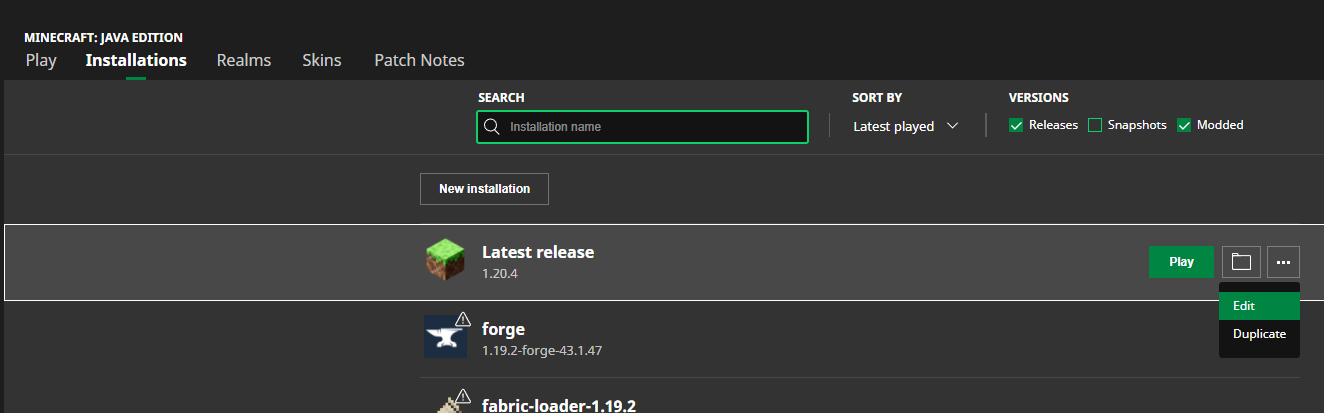
- Open the Minecraft launcher
- Go to the Installation tab
- Select the version you use to play, click on the three dots and Edit
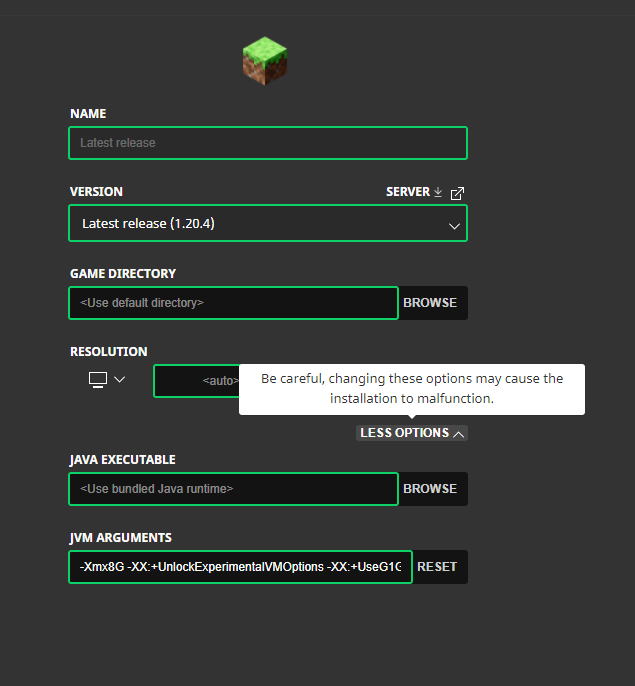
- On the next screen, expand the See More menu and check the JVM argument.
The first few bits about the Xmx are related to the amount of RAM you allow your PC to use for Minecraft.
A general recommendation is to use up to 50% of your total RAM capacity. For example, if you had a total of 16 GB of RAM, you could allocate 8G for Minecraft. Typically, it's not recommended to go over that 50%, as it could have the opposite of the desired effect and create even more lag, as your computer does not have enough RAM to run the other operations outside of Minecraft on your computer. You can also experience lag if you don't have enough Ram allocated either. Especially if you go to places where redstone machines are on or there's a high number of entities. Play around with the amount till you find a good balance.
To decrease lag you can also play around with your Video settings in Minecraft itself. Often times your render distance, quality, or particle settings can make a big difference.